
ELRS Receivers Not Binding
Solutions Below:
We have identified a common issue with new receivers currently arriving in parts orders. We believe only in very rare circumstances the receivers are malfunctioning but if you are having issues you are not alone. HOWEVER, there are some new features causing a majority of issues. Here is a quick hit list of things to try:
The Problem: Receiver not binding using the traditional method in the Professional Development. Thus causing significant frustration with recent deliveries.
Tech Support is always available to assist if there are issues, please contact Keson directly at keson@dronesports.us
Quick Things to try:
1. Are you using a fresh battery for binding? A drained battery will not allow the drone to arm no matter what you do. This can also cause the receiver to lose the bind completely.
2. Bind the Drone in less than 30 seconds once drone put into bind mode. Not binding fast enough can cause the receiver to go into wi-fi mode. This mode is identified by rapid blinking on the drone receiver. Disconnect battery power and try again.
Recommended: Have the radio on, and the word "Bind" highlighted with the cursor. This ensures it is one button push to activate bind mode on the radio. Once prepared, then put drone into bind mode by cycling the power connection quickly. "Tap, Tap, Connect" the power leads of the battery and drone to put the drone receiver into bind mode. Then hit "bind" on the radio. Binding will happen in a second and the drone receiver LED will turn a solid green or blue.
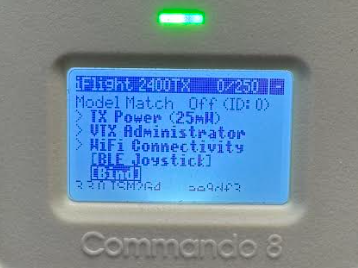
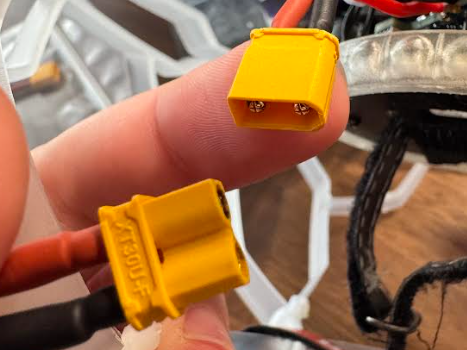
3. Solid light on receiver indicating drone is bound but no movement in Betaflight "Receiver" tab. Re-run the CLI Code and this should resolve the issue. Expect to see the bars move when you move the sticks on the Commando 8 once you run the CLI code one more time.
4. Telemetry Lost does not mean binding is lost. During flight you may hear "Telemetry Lost". This can be mitigated and I will show you below but please note telemetry is simply telemetry data being shared from the drone to the radio. This is more for first person view or GPS operations. Telemetry data is not visible for Drone Soccer. The radio and drone are still bound and operational.
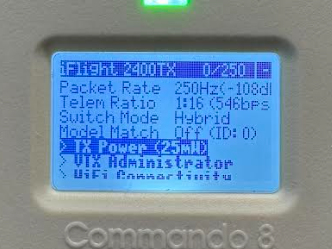
Recommended: We recommend turning the radio transmitter power down upon initial power up. Out of the box, the radio is set to 500mW of power. This is great for controlling the drone up to 5 miles away but overkill for a cafeteria or worse, a gymnasium with very reflective surfaces. All this power is bouncing off the walls of the room you are in, thus causing interference and losing telemetry or bind when 10+ drones are operating at the same time. Under the "Express LRS" Menu above "Bind", you will find "TX Power". Select and drop to "25mW".
NEW replacement Receiver with existing Radio or Vice Versa:
If none of the above methods apply or have worked, or If you have a new receiver as a replacement part or a new build you are binding an existing Commando 8 to. Try these options if you are still having binding issues:
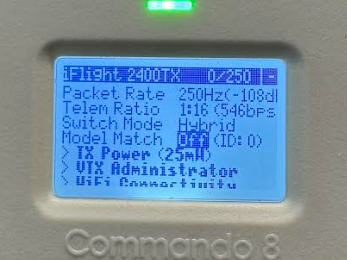
1. Ensure Model Match is Off. In the ExpressLRS menu above "Bind" there is a selection. If this was ever accidentally turned on, it will prevent binding to new drones. Please turn off and try to bind again.
2. FIRMWARE Mismatch. This is the real issue and so far has been rare. Major firmware updates of 2.0 and 3.0 will not connect with one another. If this is the case, please reach out to us and we will work with you to resolve the situation. The video to find this out is below and everything can be done through the radio menu and using your phone. We have not seen this yet but it is possible this is preventing a new receiver or radio binding with an older one.
https://www.youtube.com/watch?v=ZE2VTfvysQ8
We have been receiving many calls from customers with binding issues and we believe many are due to simple things acting as they should but not covered under the Professional Development. We are working on updates now to bring the training more in line. Thank you to your feedback. We are also working with iFlight to control and prevent future firmware updates in new shipped equipment. We believe the above will resolve most issues in the community today but If you continue to struggle or have questions please give us a call 719-645-6102 or email Keson at keson@dronesports.us